 Moyna AI
Write a Bangla wedding invitation on a photo
Wedding season is here. In the free demo of the Moyna Image Editor you can put your invitation in Bangla on a photo, in your browser, without signing up.
01Open the demo
Open moyna.ai/en/image-editor. You will see a demo photo and a text box.
02Pick the wedding photo
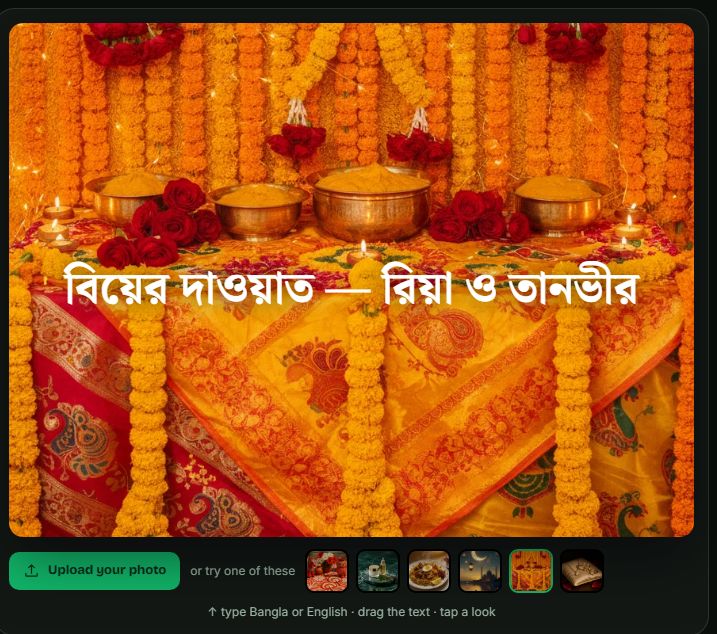
Under the demo, pick the ready photo "বিয়ের দাওয়াত" (wedding invitation): marigolds and turmeric bowls of a gaye holud.
03Type your lines in Bangla
Type in the "your text" box, for example "বিয়ের দাওয়াত — রিয়া ও তানভীর". The text appears on the photo as you type.
04Pick a look
Choose one of three looks: Elegant, Sticker or Headline.
05Drag it into place
Drag the text to where it fits on the photo.
06Or use your own photo
The page also has an "upload your photo" button.
07Before you send it
Read the names, the date and the venue once more. Keep each line short: in the demo a long line can run past the edge of the photo. And check the joined letters (যুক্তাক্ষর) after typing.
08About this page
It shows the free public demo of the Moyna Image Editor as it works for a visitor who is not signed in, read on 2026-11-14.